
How to redeem Morioh High codes
This guide preserves the original source’s instructions and dated context; it does not confirm successful in-game redemption. Join Not A Stand Game, open Morioh High, then go to Menu → Settings → Codes. Follow the diagram below to locate the code field and Redeem button.
Latest code reports
Use the game’s code report page for current recorded rewards and statuses. This guide retains dated source instructions and context; archived comparisons are not a second current code list.
Open this game’s code reports ↗Overview
START HERE
Join Not A Stand Game, open Morioh High, then go to Menu → Settings → Codes. Follow the diagram below to locate the code field and Redeem button.
Source record October 15, 2026 · Guide revised October 21, 2026
Original diagram by Morioh High Codes, based on published menu instructions. This is not a game screenshot. See GamesRadar+’s published game screen ↗ · Open full-size diagram ↗
On a small screen, enlarge the diagram and scroll sideways to read it. Use the arrow keys when the image area has focus.
See GamesRadar+’s published game screen ↗ ↗ Open full-size diagram ↗ ↗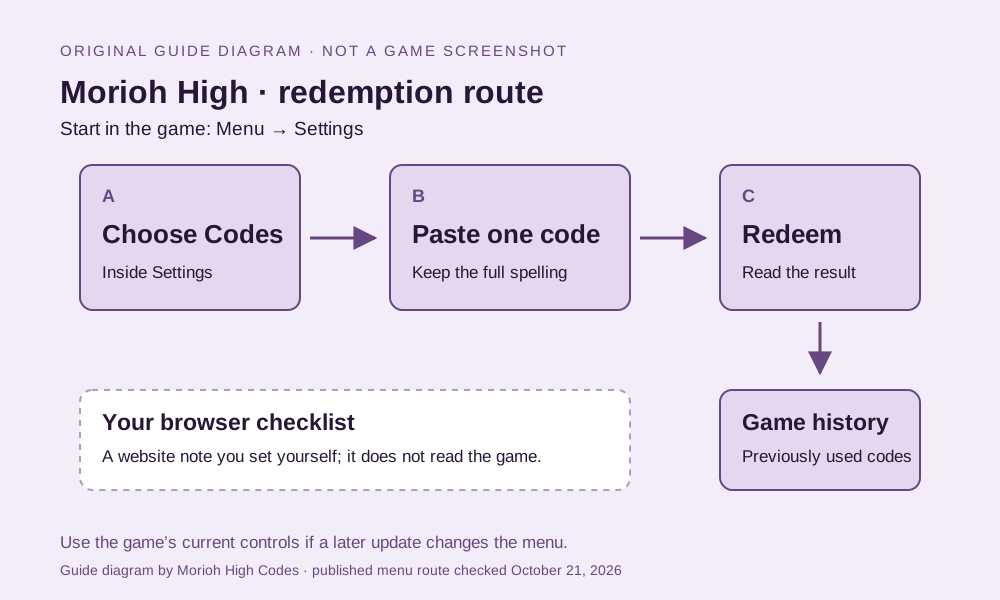
A · Codes tab
Open Menu, then Settings. Select Codes to reach the redemption area.
B · Code field
Paste one complete code into the game’s code field. Use Copy in the code index to keep the spelling intact.
Copy in the code index ↗C · Redeem & history
Select Redeem and read the game’s response. The published screen shows previously used codes under USED ON THIS ACCOUNT.
The diagram explains the published route; use the game’s current controls if the menu changes.
FOUR STEPS
From the group to the result
- 01 Join the creator community Join Not A Stand Game on Roblox , then launch or rejoin Morioh High . GamesRadar+ reports group membership as a redemption requirement.
- 02 Open Menu Use the on-screen Menu button. Published PC instructions also describe the M key.
- 03 Choose Settings → Codes Open the Codes tab, paste one complete code into the CODE line, and remove surrounding spaces.
- 04 Select Redeem and read the result Read the game’s response before marking a website note. The account history in the screenshot and your browser checklist are separate records.
What to check next
Find the check that matches a rejected code or launch problem ↗
- Using a phone?: Use the on-screen Menu button, then Settings → Codes. The M shortcut is for a keyboard.
- Joined the group after opening the game?: Rejoin the experience. GamesRadar+ reports Roblox group membership as a requirement; joining Discord is a separate action.
- The game says a code was used?: Read the account result first. “Marked redeemed here” is only your browser note, and clearing it does not change account history.